The Payment API is organized around REST, it has predictable, resource-oriented URLs, and uses HTTP response codes to indicate API errors.
We use built-in HTTP features like HTTP authentication and HTTP verbs which are understood by off-the-shelf HTTP clients.
JSON is returned by all API responses, including errors.
To make the API as explorable as possible, accounts have test mode and live mode API keys. There is no "switch" for changing between modes, just use the appropriate key to perform a live or test transaction.
Requests made with test mode credentials never hit the banking networks and incur no cost.
This system provides a 3-layer security mechanism:
1. Only approved software may consume this API. This is secured by API Keys provided to each individual system. Prior to issuing this API Key for the production environment detailed testing and analysis of system security will be undertaken.
2. Each merchant will be issued a unique API Key that will link their payments to their specific business and bank account.
3. Individual Credit Cards are not stored in any form by Provet. The Credit Cards are stored by an external provider who will provide Provet a Token for future access. These tokens are linked to the individual merchant and are only stored on Provet Servers. In order to use these tokens, the appropriate GUID for the client is required by the software.
The consuming software must store the API Keys securely and must be stored encrypted at Rest. Ideally the merchant API Key should be stored in the secure key store of the platform.
Authenticate your account by including your secret keys in API requests.
Your API keys carry many privileges, so be sure to keep them secure! Do not share your secret API keys in publicly accessible areas such GitHub, client-side code, config files etc.
Authentication to the API is performed via HTTP Basic Auth. Provide your Software API key as the basic auth username value. Provide the Merchant API Key as the password.
All API requests must be made over HTTPS. Calls made over plain HTTP will fail. API requests without authentication will also fail.
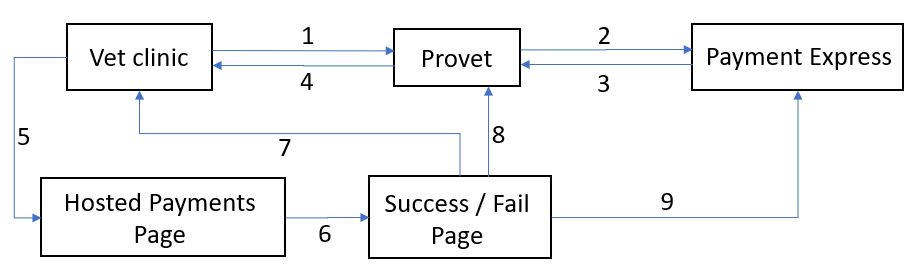
1. Clinic sends subscription request to Provet (Json)
2. Provet sends subscription on request to PaymentExpress (XML)
3. PaymentExpress responds Provet with URL to pay (XML)
4. Provet responds clinic with URL (Json)
5. Clinic opens URL and enter card details
6. Payment is processed by PaymentExpress
7. Success/Failure message is displayed to user
8. PaymentExpress sends encrypted payment response to Provet (XML)
9. Provet communicates with PaymentExpress to obtain response and get the Token for future payments (XML)
You may use the following card numbers to simulate payments and common declines in the Test enviroment:
Visa
4111 1111 1111 1111
4111 1111 1111 1119 (fails Luhn check)
4999 9999 9999 9109 (fails Luhn check)
4242 4242 4242 4242
4999 9999 9999 9103
4999 9999 9999 9108 (fails Luhn check)
MasterCard
5431 1111 1111 1111
5999 9999 9999 9108
5123 4558 0630 8521
5123 4590 4605 8920
2223 0000 1000 0005
Available subscription intervals:
Daily
Weekly
Fortnightly
Monthly
Quarterly
Yearly
Supported subscription statuses:
New
Active
Suspended
Cancelled
Completed
Supported payment status:
Purchase
Auth
Complete
Refund
There is a 3-step process to subscribe to a payment plan:
1. Create a Subscription Request by posting a new Subscription object via: [POST] https://payments.provet.com.au/api/1.0/wellness/subscription/
2. Open the URL returned and proceed with payment
3. The Subscription Id will be returned. You can check the full status by sending a [GET] https://payments.provet.com.au/api/1.0/wellness/subscription/{id}
You should permanently store the Subscription Id against the specific subscription, which allows later confirmation of the status of the payments for that specific plan.
Optionally your system can store the Client Id against the specific client. This allows additional subscriptions to be added to that client.
A subscription is created by posting a new Subscription object via:
[POST] https://payments.provet.com.au/api/1.0/wellness/subscription/
New Subscription object
"Description" – friendly description of the subscription (e.g. Bronze Wellness Plan for Rex – John Smith)
"Interval" – month/fortnight/week... (see Subscription Interval above for all possible values)
"IntervalCount" – the number of times the amount will be charged
"Amount" – the amount charged each interval
"Currency"
"Initial Payment" – this is a payment that is taken immediately upon plan enrolment in place of the regular payment for that interval
"AutoRenew" - if the subscription should be automatically renewed after the end of the interval count or not
"Client"
"Id" – Provet unique Id
"FirstName"
"LastName"
"Phone"
"Email"
"Address"
"Line1"
"Line2"
"Suburb"
"State"
"Postcode"
"Country"
Where a client wishes to sign up for multiple subscriptions the same endpoint may be used.
In that case simply pass the existing Client Id in the object and leave the other Client fields (Name, Phone, Address, ...) empty.
The client will still be prompted to enter his card details for any additional subscription.
Renewals: if the AutoRenew flag is set to true, the subscription will be automatically renewed for the same Interval originally set.
If the AutoRenew flag is set to false, the subscription will marked as Completed and no further payments will be taken from the client.
The response to the POST will be the Subscription Id and the URL for the client to proceed with the payment.
Returns the Subscription for the given Subscription Id.
[GET] https://payments.provet.com.au/api/1.0/wellness/subscription/{id}
Subscription object
"Id" – Provet unique Id
"PaymentMethodId" – Provet unique Id
"ClientId" – Provet unique Id
"Description" – friendly description of the subscription (e.g. Bronze Wellness Plan for Rex – John Smith)
"CreatedOn" – Date the subscription was created
"Status" – The current status of the subscription (e.g. New, Active, Cancelled, ...). For all possible status see Subscription Status above.
"Interval" – month/fortnight/week... (see Subscription Interval above for all possible values)
"IntervalCount" – the number of times the amount will be charged
"Amount" – the amount charged each interval
"Currency"
"Initial Payment" – this is a payment that is taken immediately upon plan enrolment in place of the regular payment for that interval
"Remaining Payments" – number of payments still to be taken for that subscription
"AutoRenew" - if the subscription should be automatically renewed after the end of the interval count or not
"History"
"Status" – Status of the subscription
"Date"- Date when the status changed
"Payments" - A list of Payment Ids that were processed for that subscription
Returns a list of all subscriptions for that client.
[GET] https://payments.provet.com.au/api/1.0/wellness/subscription/clientId={id}
Parameter:
• ClientId
Returns the payment Url of a new subscription.
[GET] https://payments.provet.com.au/api/1.0/wellness/subscription/{id}/paymenturl
Parameter:
• SubscriptionId
Returns a list of subscription Ids and Status.
[GET] https://payments.provet.com.au/api/1.0/wellness/subscription/status/startDate={startDate}&endDate={endDate}
Parameters:
• StartDate: the start of the date range
• EndDate: the end of the date range
This will return all the subscriptions that meet the criteria for all clients associated with the Authenticated account.
Returns a list of Subscription Payment.
[GET] https://payments.provet.com.au/api/1.0/wellness/subscription/status/startDate={startDate}&endDate={endDate}
Parameters:
• StartDate: the start of the date range
• EndDate: the end of the date range
Subscription Payment object
"SubscriptionId" – Provet unique Id of the Subscription
"PaymentId" – Provet unique Id of the Payment
"Date" – date the payment was processed
"Amount" – the amount charged
"Currency"
"Successs" – if the payment was successful or not
This will return all the subscription payments that meet the criteria for all clients associated with the Authenticated account.
Set the status of a subscription to Cancelled. It does not delete the subscription, you may still query the subscription id to get the details and history.
[DELETE] https://payments.provet.com.au/api/1.0/wellness/unsubscribe/{Id}
This will return the Subscription Object.
A susbscription is automatically suspended if during the rebill phase we are unable to charge the card for 3 times in a row.
No further attempts to charge the card will be done for that subscription.
This endpoint will try to charge the card again (as many times as there are outstanding payments) and if all successful it will set the subscription back to Active.
[PATCH] https://payments.provet.com.au/api/1.0/wellness/reactivate/{Id}
Parameters:
• SubscriptionId: the subscription id we are reactivating
Update the Renew flag of an existing subscription.
[PATCH] https://payments.provet.com.au/api/1.0/wellness/subscription/{id}/autorenew/{autoRenew}
Parameters:
• SubscriptionId: the subscription id we are updating
• AutoRenew: boolean
Returns the updated subscription object.
Changes the stored payment details of a subscription.
[PATCH] https://payments.provet.com.au/api/1.0/wellness/card/
Parameters:
• RedirectUrl: the URL the user will be redirected to once the validation is complete
• SubscriptionId: the existing subscription Id
Changing payment details requires patching the subscription payment method.
The response to the PATCH will be a URL for the client to insert the new card details.
An Auth transaction of $1.00 will be made to the card which will determine that the card is valid and not on hot or stolen card lists and that it has the correct expiry date. The transaction is not completed (no funds will be transferred).
If a client has multiple subscriptions, he/she will need to perform this action for each of the subscriptions.
Get the details of an existing client.
[GET] https://payments.provet.com.au/api/1.0/client/{id}
Returns the client object.
Update the details of an existing client.
[PUT] https://payments.provet.com.au/api/1.0/client/
Parameters:
• Client object: the updated client object
Returns the updated client.
Separate from the subscriptions, a client can perform a payment of an invoice, order or statement.
A card must be validated before being used to perform any of these transactions.
An Auth transaction of $1.00 will be made to the card which will determine that the card is valid and not on hot or stolen card lists and that it has the correct expiry date. The transaction is not completed (no funds will be transferred).
After the validation is done the details will be stored as a payment method for that client and a purchase or pre-auth can be done using the charge API described below:
[POST] https://payments.provet.com.au/api/1.0/card
New Payment Object
"RedirectUrl" - The URL the user will be redirected to after the validation is complete
"Currency"
"Client"
"Id" – Provet unique Id
"FirstName"
"LastName"
"Phone"
"Email"
"Address"
"Line1"
"Line2"
"Suburb"
"State"
"Postcode"
"Country"
Where a client wishes to store multiple payment methods simply pass the Client Id and the RedirectUrl in the object and leave the other fields empty.
The response to the POST will be the URL for the client to proceed with the card validation.
There are two payment options that can be done:
1. Purchase
The amount requested will be processed straight away.
2. Auth (reserve funds)
An Auth transaction type verifies that funds are available for the requested card and amount and reserves the specified amount. The amount is reserved for a period of up to 7 days (depending on merchant bank) before it clears. No funds are transferred.
If the merchant does not wish to take money from the customer no action needs to be taken. The reservation on the money will expire after 7 days.
When ready, a Complete transaction (described below) is sent to finalize the funds transfer.
[POST] https://payments.provet.com.au/api/1.0/charge
New Payment Object
"Description" – friendly description of the payment
"Amount" – the amount to be taken
"Surcharge" – (optional) the surcharge applied to the payment on top of the Amount
"Notes" - (optional) any notes related to the payment
"Currency"
"ClientId" – Provet unique Id of the client being charged
"PaymentMethodId" – Provet unique Id of the payment method to be used
"IsPreAuth" – if the payment is an Auth or a Purchase
NOTE: The final amount charged to the card is Amount + Surcharge.
The response will be a payment object.
If necessary, the API allows you do a refund of a previous payment.
The amount of the refund cannot exceed the original amount of the transaction.
Multiple Refund transactions can be processed to the maximum amount of the original matched transaction.
[GET] https://payments.provet.com.au/api/1.0/refund/paymentId={id}&amount={value}
Parameters:
• PaymentId
• Amount
Returns the refunded payment object.
Complete (charge) a previous Auth transaction.
The amount sent in the Complete transaction can be less, more, or identical to the original amount specified in the original Auth transaction.
If the Complete transaction is sent when the funds are still reserved (i.e. within the reservation period) and the amount is identical or less than the original Auth amount, then the funds are guaranteed to be available for the merchant to charge.
If the amount is more than the original Auth amount then the amount up to the original Auth amount is guaranteed, however the additional amount is not.
If the Complete transaction is sent when funds are not reserved (i.e. after the reservation period) the transaction can still be processed, however the funds are not guaranteed.
If a Complete transaction is processed for a lesser amount than the original Auth amount, the remaining balance is no longer reserved.
[GET] https://payments.provet.com.au/api/1.0/completepreauth/paymentId={id}&amount={value}
Parameters:
• PaymentId
• Amount
• Surcharge (optional) the surcharge applied to the payment on top of the Amount
• Notes (optional) any notes related to the payment
NOTE: The final amount charged to the card is Amount + Surcharge.
Returns the completed payment object.
Returns the Payment object indicating whether the payment was successfully collected.
[GET] https://payments.provet.com.au/api/1.0/payment/{Id}
Payment Object
"Id" – Provet unique Id
"Description"
"Date" - date the payment was taken
"Amount" - amount charged
"Currency"
"Type" - the type of the transaction (e.g. Purchase, Auth, Refund, ...)
"MaskedCardNumber" - the initial 6 numbers and the last 2 of the stored card
"CardType" - the type of card used (Mastercard, Visa, ...)
"CardHolderName" - the card holder name
"Client details"
"Success" – if the payment was successful or not
"Notes" – information about the payment (e.g. approved, declined, reason it was declined...)
Returns a list of all payments for that client.
[GET] https://payments.provet.com.au/api/1.0/payment/clientid={id}
Parameter:
• ClientId
Returns a list of all payments methods for that client.
[GET] https://payments.provet.com.au/api/1.0/paymentmethods/clientid={id}
Parameter:
• ClientId
Payment Method object
"Id" - Provet unique Id
"Description" - the payment method friendly description
"MaskedCardNumber" - the initial 6 numbers and the last 2 of the stored card
"CardType" - the type of card used (Mastercard, Visa, ...)
"ExpiryDate" - the card's expiry date
"CreatedOn" - when the payment method was added
"DeletedOn" - when the payment method was deleted
Delete a payment method for a client.
[DELETE] https://payments.provet.com.au/api/1.0/paymentmethods/{id}
The updated payment method object.